Thursday, August 20, 2009

Writing a Law Review Article

This post is dedicated to all of the law students this year who must endure the ultimate academic exercise: writing a law review article. I say "academic" because no other rite of passage in one's law school career will be remembered with such drunken stupor. You will complete your masterpiece only to discover that not even you wish to read it. You will enter the world of practice to learn that only nerds and assholes adhere to those ridiculous rules in that mysterious Blue Book. And yes, you really would have been much better off writing a 10-page motion or legal memorandum that you could have used as a writing sample for your job search.

Despite these realities, endure you must. For the representations made in every law school application include an implied warranty of fitness to endure and excel at that which serves little purpose.

And so, if I were faced with this balding task today, here would be my approach:

1. Picking a Topic

Option A: Go to the professor you think is most likely to land you your dream job and ask him or her what you should write about. Chances are, that professor will have you write something that he or she can use to get a leg-up on research for a forthcoming publication.

Option B: Call a law firm that you want to work for and ask the head honcho what issues might be pertinent to his or her caseload.

Option C: Check out your action group's website. All of us have action groups. I tend to follow the ACLU's work, but also venture into what's happening at the WTO and the USTR from time to time. These days, all of the players in your action group more than likely have a blog where they write about fringe issues--that is, those in the realm of what should be as opposed to what is. These conversations should give you what you need to get a good start.

Option D: If none of the above works, write about how much more fulfilling your life would be if you were working at a surf shop in Hawaii instead of writing a law review article.

2. Conducting Research: Use Organization Tools

A. Google Reader. To help organize my research, I would use Google Reader to subscribe to every feed out there that related to my topic. Once you've got all the feeds into your reader, scroll down and make sure you've got feeds dating back a couple of years. Then go to town with your search function. You should be able to get up to speed quickly on all of the pertinent events and issues, and the original source of the information.

B. Evernote. This free software gem is a must for keeping your research organized. I've previously explained the utility of Evernote in several posts (here and here). Creating a database (or "notebook") of tagged web-clippings and .pdf files will help you locate the citation you need in a hurry. I would even start out by inserting tags that tracked the citation system used by the Blue Book--e.g., Constitutions, Statutes, Regulations, Cases, Agency Memoranda, Books, Treatises, Periodicals, Web_Only, Unpublished, Federal, State, Administrative, etc. Then as you go you can add in your custom tags as needed.

C. Delicious. If you are looking for a website that's dedicated to specific information, such as arrest statistics, weather statistics, environmental data, current events, or any other topic of interest, delicious will tell you what others use to find that type of information. Here is a link to my account.

D. The Government. There's nothing like using the government's own records to verify its teenage tendencies. Thanks to our country's superb sunshine laws, most agencies are realizing how much time they can save from answering public information requests by posting documents and information online. Find the agencies that regulate matters pertinent to your topic and clip their information into your Evernote notebook. If that doesn't work, send a public information request (most agencies allow you to submit public information requests online).

3. Drafting and Editing Your Article.

A. Great Source for Legal Writing. Evan Schaffer's blog, The Trial Practice Tips Weblog, offers some excellent advice about writing efficiently. Read it before you get going and it may actually save you some time.

B. Send Your Work to Important People (or People who Think They're Important). If you elected to pursue Option A, B, or even C in selecting a topic, keep the communication going. Send your drafts to the contacts you have made and ask for their input. Even if they don't respond, they will begin to recognize your name in their email box (and if your topic is pertinent to the issues they are dealing with at work, chances are they will probably read it and let you know what they think).

C. Make Several 1Ls Edit Your Work. Think of this approach as an opportunity to sharpen your negotiation skills. I'll let you conjure up your own sales pitch. The key is dividing your paper up into sections of no less than 5 pages per person. More than 5 will surely get you sued for fraud.

4. What to Do with Your Article When it's Finished

A. Send it to Everyone You Know. Whether your article is published or not, let everyone know you've written something--especially the contacts you have made through Options A, B, and C, above. I promise only your parents will actually read it so don't worry if it's really horrible. The goal is to transform this dreadful experience into a means of gaining street credit with people you want to work with when it's all said and done.

B. Convert War and Peace into a Legal Memorandum You can Use as a Writing Sample. Don't let this be all for naught. When you're finished, you will have researched a tricky legal issue and developed a robust conclusion. Transform your work of art into a 10-page legal memorandum and include it with every resume you send out. Some might suggest providing an excerpt of your article as your writing sample is acceptable. To me, this is a foolish idea. Your resume will tell your prospective employer that you have law review experience. A legal memorandum will tell your prospective employer how you think and do so in a way that's familiar to what he or she sees on a daily basis. If there is any doubt in that proposition, when was the last time you sat down to read a law review article for fun?

Best of luck enduring academia....

Friday, August 7, 2009

Witness Interviews for Low-Dollar Cases: Outscoop a Settlement


Fact-determinative cases worth $20,000 or less may be the most difficult cases on the block. It's enough money to get your client mad, but not enough to make an arrogant opponent want to make any real progress. Nonetheless, in the land of the free, we need to respect everyone's access to the courts, no matter how big or small the claim (and sometimes we just get stuck with these cases).

Whether you're on the plaintiff's or the defendant's side, chances are things will move slow enough to give you an opportunity to gather the facts informally, then have a sit-down with the lawyer on the other side and see if something can be worked out before discovery influences the parties' temperment.

Here's my approach:

Step 1. Identify your capstone witnesses. There's usually one, maybe two, third parties that will make or break a case. Find that person early and see if he or she will talk. If this person is good for you, do a video interview. You avoid any lawyer-witness conflict issues and there's absolutely no question about what was said and when. Be sure to ask all the usual precatory stuff: "Are you under duress? Have you taken any medication that would prevent you from understanding my questions and answering them truthfully?" Then do the usual "general-to-specific" line of questioning. The key: capture the witness' story and the witness' demeanor.

Step 2: Identify your ancillary witnesses. These guys usually saw something minor or heard someone say some detail that just adds gravy to the train. I would also include in this category at least one person who knows your capstone witness and can testify to that person's credibility. Depending on their level of sophistication, you can go in-person and interview them with a digital recorder or just send them a list of questions (no more than 10 is a good rule of thumb) with blanks where they can fill in the answers.

Step 3: Go to Uncle Sam. Use your Public Information Acts and Government websites. Get the accident report, the deeds, the appraisal records, and the like. Nowadays, most of the open records requests I've sent come back via email and cost me a whopping $0.00.

Step 4: Try to Negotiate a Peace Treaty. Take what you've got to your opponent and make your case for settlement. Chances are, your opponent will understand that you've taken the case seriously and see something much more persuasive than your stinging letters: a vivid image of what the evidence will actually look like.

Tuesday, July 21, 2009

Leave Room for Annotations by Resizing PDF Documents

Contrary to the Exxxtenz advertising campaign, sometimes smaller is actually better. Take that PDF roll of client documents you just scanned or all those deposition transcripts. Wouldn't it be nice to have enough room in the margins to make fail-safe, "don't skip this, stupid" annotations (either by hand or with PDF-Xchange Viewer)?

Thanks to modern technology, you can get smaller immediately, and without the aid of high-priced pills or Swedish-made suction devices. If you have an existing PDF file, just reprint it using CutePDF, but scale down your print size to about 75-80%. That will leave plenty of room in the margins for you to make your big, bold notes (and hopefully reduce the need to do document or deposition summaries).


The little blurbs you can make with Adobe or PDF-Exchange Viewer are nice. Actually making the notes within the printable space on the document, however, means no one will miss the boat as a result of being unfamiliar with your .pdf software.

Friday, July 10, 2009

Making Non-Party Discovery Work

Here's a short list of tips for ensuring that you don't have to make a routine practice of seeking to hold non-parties in contempt for not responding to discovery requests.

1. Call the non-party beforehand and explain what you are about to do.

Even a monkey could figure out why this is important.

2. Use a law enforcement official to serve the subpoena on normal folks.

In Texas, anyone over 18 that is not a party can serve a subpoena in a civil case. If you're serving an engineer or a doctor, chances are they know what it is and that they're suppose to take it seriously. If you're serving an 22-year-old overnight stocker at a grocery store, they've probably never seen a subpoena before and may very well throw it in the trash if some 18-year-old runner hands it to them. The authority of the "badge" works wonders.

3. Write the document request or deposition notice in a way that tells a normal person what to do.

If you want to the recipient to do the job right, tell him or her step-by-step what to do and explain the process in a way that's conducive to someone who's probably worried about getting sued. Whatever you do, don't just cut-and-paste a form book non-party discovery request--I've seen better command of the English language on a restroom door. I've found using headings like a FAQ webpage works well:

I. Have I been Sued?
II. What Right do You have to Request Information from Me?
III. Will I be Paid for My Time and Effort?
IV. When Do I Need to Respond?
V. How Do I Need to Respond?

You get the idea.

4. Call the non-party after the subpoena is served and arrange for document pick-up or deposition logistics.

Establishing a level of comfort or respect with the witness is crucial for avoiding a courthouse contempt hearing. So is making sure the witness knows where to go, what to bring, and when he or she will be able to pick up the reimbursement check.

Monday, June 29, 2009

Using Evernote to Build a Customized Blawg Database

I've previously posted about how useful Evernote is for logging your cases and keeping tract of case notes (see related post). Recently I've discovered another invaluable feature. I'm a big fan of reading legal weblogs (a.k.a. "Blawgs") and often find very useful tips--useful tips that I often can't remember or forget how to find again.

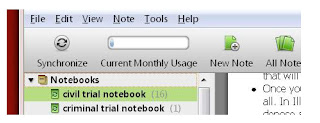
If you too suffer from this unfortunate mind spasm, there's a solution. You can create a new set of notebooks in Evernote. I've created two--one titled "civil trial" and the other "criminal trial."


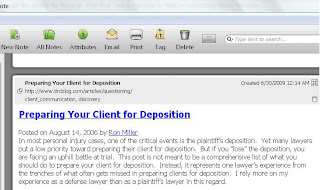
You can then clip (copy) and tag all of those useful Blawg posts into the corresponding notebook in Evernote. (For consistency, I've tagged all of the clipped posts using the same system I used to create my digital legal research library (see related post).)


Now your blogs are simply a click or a word-search away--all stored conveniently in your Evernote software.

Friday, June 26, 2009

Using PDF-Xchange Viewer to Rid Yourself of Exhibit Stickers

I have posted previously about the benefits of using PDF-Xchange Viewer instead of Adobe Reader to view and edit PDF files. Click here to download the free version.

Here's how to use the free version PDF-Xchange Viewer to dramatically reduce the number of yellow "Exhibit" stickers you purchase every month.

1. Take a yellow Exhibit sticker--preferably the kind that just says "Exhibit," not "Plaintiff's Exhibit" or "Defendant's Exhibit," and physically paste it onto a blank sheet of paper.

2. Scan the blank sheet of paper with the Exhibit sticker into your system in color.

3. Open the scanned sheet of paper in PDF-Xchange Viewer.

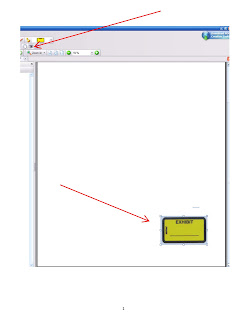
4. Use the camera clipper and clip an image around the Exhibit sticker.
5. Go to the stamp icon and pull up the drop-down menu.

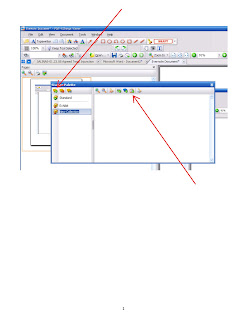
6. Select "Show Stamps Palette."

7. Choose "Create New Stamps Collection" on the upper left-hand side of the Show Stamps Palette window.

8. Select "Create New Stamp from Clipboard Image" on the upper right-hand side of the Show Stamps Palette window.
9. Your Exhibit sticker should now appear in your new stamp collection.

10. Name your Exhibit sticker collection anything you want.

Now you can organize your scanned documents as trial and hearing exhibits without having to paste on exhibit stickers. What's great is you can use PDF-Xchange's typewriter function and type anything you want on the exhibit sticker stamped on your scanned documents, such "P-1" or "P-MSJ-3."

Friday, May 29, 2009

What to do with the Pile(s) of (Work)?

Growing up, a certain somebody often reminded me of how applicable baseball is to the real world. Having to stare at the real world everyday now, I of course fully appreciate that wisdom: Everyone wears spikes and a glove to court and the bailiffs don't blink twice about all the bats piled up in the jury box. Yeah, not so applicable.

But today, while looking at the piles of things I haven't done yet on my desk, I thought of the old baseball-coach instructions for overcoming a 10-run deficit: Chip away, inning-by-inning.

Law practice when you're not the boss is heavily prone to getting behind. You start out a case with detailed plans, concrete objectives, and know exactly what to do to get where you want to go. Then the inevitable happens, "We've got this brief that I'd like you to work on" or "would you mind . . ." And up go the piles.

So what do you do? Stay late and get them knocked out? Most of the time. But sometimes that's just not an option.

The key for me is to make some progress--get some items checked off the list today (i.e., don't go for the homerun). So I'm identifying phone calls and short letters and knocking those out first. The discovery responses and contract reviews will come later. At the end of the day, my list will be smaller and filled with at least a few crisp, bold strike-out lines, not heavily notated with "started--05/29/09."

So I suppose I find myself digging my spikes into the floor and shooting for a couple of singles before the end of the day. By next Tuesday, I'll have that one-run lead back in time for the closer to come through in the 9th.

Maybe I'll even bring by baseball glove to court next time.